Encrypt a PDF
Lock your PDFs with a password and finely manage permissions: printing, copying, modifying. Directly in DocuNest's unified PDF editor.
Encrypt a PDF in DocuNest: 100% local processing on Windows, macOS, and Linux. Automatable via the docunest CLI.
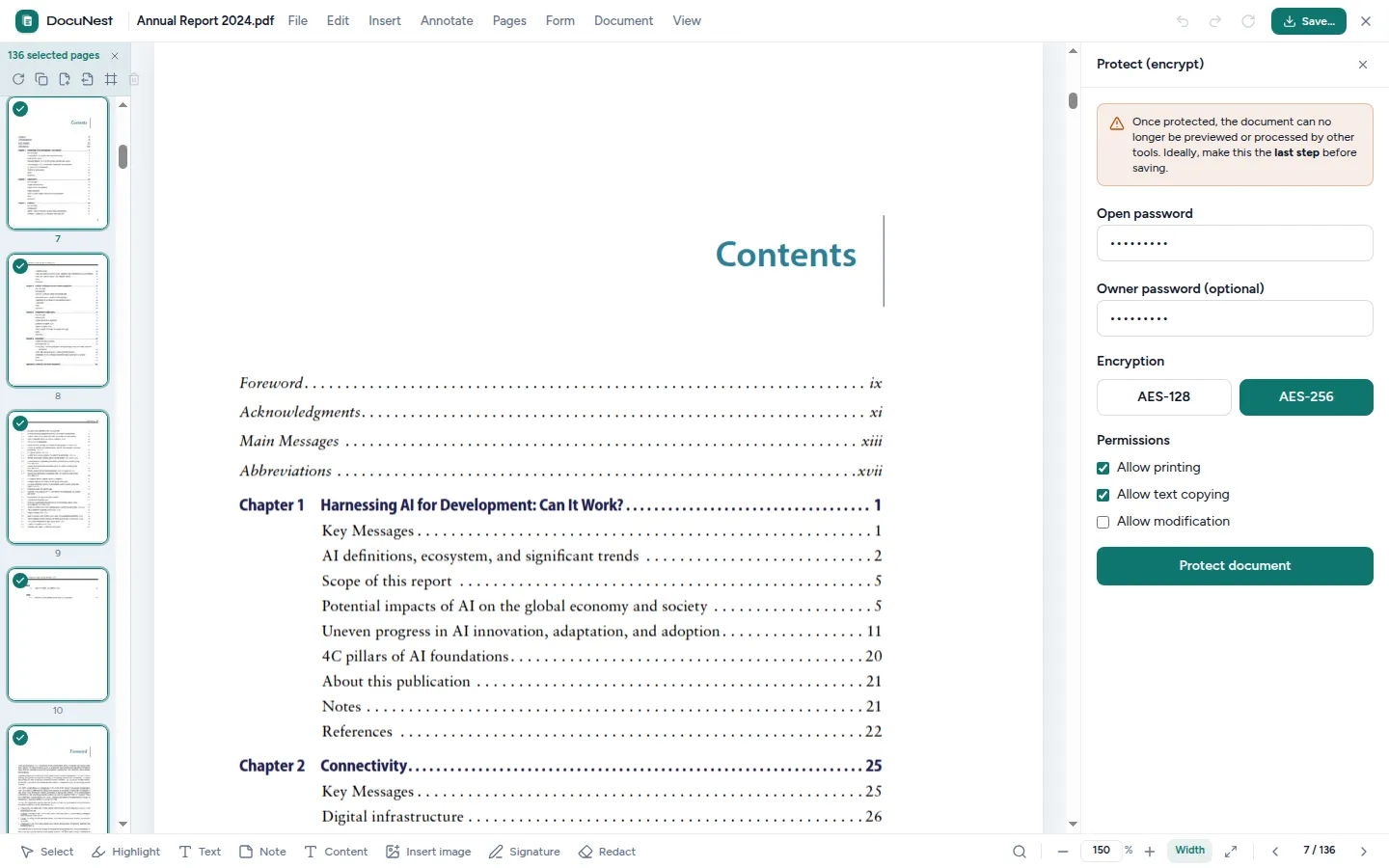
Built into the unified PDF editor. This tool is used directly within the DocuNest editor: open your PDF, apply the action, undo with Ctrl+Z if needed, then move on to any other tool — without ever reloading your file.
Discover the PDF editor →Features
Use cases
Sensitive documents
Protect contracts or personal data before emailing them.
Controlled distribution
Allow reading but deny printing and copying of your documents.
Secure archiving
Encrypt your PDF archives to prevent unauthorized access.
Command line
Same result as the interface, in one command. Nothing leaves your machine.
docunest — zsh
local# Encrypt a PDF ❯ docunest pdf encrypt -i document.pdf --user-password "secret" --strength aes256 -o result.pdf ✓ Done — file written locally, no network upload
Frequently asked questions
What security level is used?
Can I prevent printing or copying?
Can I remove the password later?
Is the encryption done locally?
Similar tools
Redact a PDF
Permanently remove sensitive areas from a PDF: text and images located under the area are irreversibly destroyed. Directly in DocuNest's unified PDF editor (Edit menu).
🏷️PDF metadata
Read or edit a PDF's metadata: title, author, subject, keywords, dates, and custom fields. Directly in DocuNest's unified PDF editor (Document menu).
✍️Sign a PDF
Sign your PDFs: draw your signature with your finger or mouse, or import an image (PNG, JPEG), then drag, resize, and rotate it on the page. Directly in DocuNest's unified PDF editor.
Stop sending your PDFs to the cloud.
Download DocuNest: the complete editor, 7-day trial, no credit card, no files leaving your machine.
Download for freeDownload DocuNest
No account required, no data collected.
Linux
Install a system package, or use the AppImage if you prefer a portable version.
Your installation in 3 steps
About a minute to set up: afterwards, everything runs offline on your machine.
File downloaded
Pick your system above: the download starts right away.
Open the file
In Downloads, double-click DocuNest_…_setup.exe and follow the installer.
In Downloads, open the .dmg, then drag DocuNest into Applications.
Double-click the package: your software center handles the install. AppImage: mark it executable, then run it.
Run your first job
Open a PDF and try a tool: merge, redact, convert, everything stays on your machine, no account needed.
Shortcut of the day
Try them as soon as the app opens
Opens the tool palette
Windows 10+, macOS 12+ (Apple Silicon), Linux (deb / rpm / AppImage)