The complete PDF editor,
100% offline.
Edit text and images in your PDFs, sign, merge, convert: 26 tools brought together in a single desktop editor. Your files never leave your computer, a private alternative to iLovePDF, Smallpdf, and Acrobat.
Over 7,000 downloads
7-day free trial · No credit card required · Windows, macOS, Linux
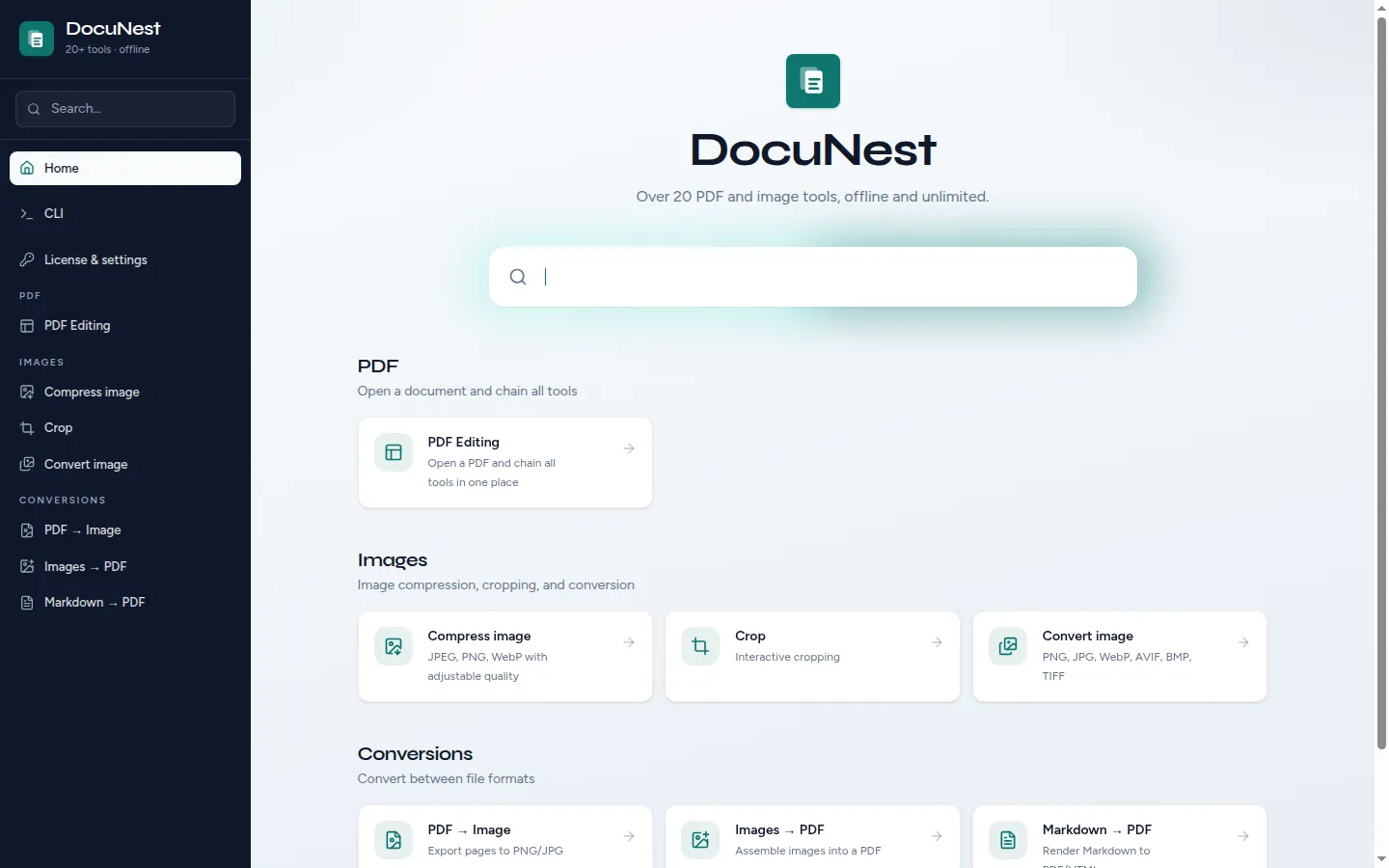
26 tools
a single unified editor
0 bytes sent
100% local processing
€30
Lifetime license, no sub
3 systems
Windows, macOS, Linux
New
A single editor. No more bouncing between twelve tools.
- ✏️Edit text using the original font
- 🖼️Replace, move, and resize images
- ↩️Unlimited undo, step history
Why ditch the cloud
Your documents don't belong on someone else's servers.
Online PDF tools (iLovePDF, Smallpdf, Adobe Acrobat web...) send your files over the internet. DocuNest processes them locally, with no account, no quota, and no subscription.
| Feature | DocuNest | Online PDF tools |
|---|---|---|
| Processing | 100% local | Third-party servers |
| Privacy | No files uploaded | PDFs transferred online |
| Content editing | Complete | Limited or non-existent |
| Internet connection | Not required | Mandatory |
| Limits | None | Quotas, max size, watermark |
| Price | €30 lifetime | Monthly subscription |
| Automation | CLI included | Rare or paid |
A complete editor, 26 built-in tools
Edit content, organize pages, sign — then convert your images. No quotas or forced watermarks.
Edit a PDF
Edit text and images in an existing PDF just like in a word processor: double-click a paragraph, retype, and the content shifts automatically. Directly in DocuNest's unified PDF editor.
Open →📄Merge PDFs
Combine multiple PDF files into a single document, in the order of your choice. You can also merge directly from the editor (File menu), without leaving your document.
Open →✍️Sign a PDF
Sign your PDFs: draw your signature with your finger or mouse, or import an image (PNG, JPEG), then drag, resize, and rotate it on the page. Directly in DocuNest's unified PDF editor.
Open →🗜️Compress a PDF
Reduce the size of your PDF files by recompressing the embedded images, with adjustable quality. Directly in DocuNest's unified PDF editor (Document menu).
Open →📸PDF to images
Convert each page of a PDF into a high-resolution image (PNG, JPEG, or WebP).
Open →Annotate a PDF
Add notes, free text, highlights, underlines, and strikethroughs to your PDFs — all editable afterwards. Directly in DocuNest's unified PDF editor (Annotation menu).
✂️Crop a PDF
Crop PDF pages by defining a crop box or uniform margins. Directly in DocuNest's unified PDF editor (Pages menu).
🗑️Delete pages
Delete one or more pages from a PDF to keep only the useful content. Directly in DocuNest's unified PDF editor (Pages menu).
🔒Encrypt a PDF
Lock your PDFs with a password and finely manage permissions: printing, copying, modifying. Directly in DocuNest's unified PDF editor.
🖼️Extract images from a PDF
Recover all the images contained in a PDF file and export them in the format of your choice. Directly from the editor (Document menu, Export embedded images).
📑Extract pages
Extract one or more pages from a PDF to create a new, lighter document. Directly in DocuNest's unified PDF editor (Pages menu).
🔎Find and replace in a PDF
Find text throughout the document and replace it in one click: a specific occurrence or all at once. Directly in DocuNest's unified PDF editor, 100% local.
🏷️PDF metadata
Read or edit a PDF's metadata: title, author, subject, keywords, dates, and custom fields. Directly in DocuNest's unified PDF editor (Document menu).
#️⃣Number pages
Add custom page numbers to each page of your PDF. Directly in DocuNest's unified PDF editor (Insert menu).
⬛Redact a PDF
Permanently remove sensitive areas from a PDF: text and images located under the area are irreversibly destroyed. Directly in DocuNest's unified PDF editor (Edit menu).
📋Reorder pages
Change the page order of a PDF with a simple drag-and-drop, directly in DocuNest's unified PDF editor.
🔄Rotate pages
Rotate one or more pages of a PDF by 90°, 180°, or 270°. Directly in DocuNest's unified PDF editor (Pages menu).
✂️Split a PDF
Cut a PDF into several files by page ranges or page by page. Split directly from the editor (Document menu, Export), without leaving your document.
📌Insert images
Insert an image (photo, logo, stamp) at a precise position on a page of your PDF. Directly in DocuNest's unified PDF editor (Insert menu).
💧Watermark (text or image)
Add a text watermark or an image layer to the pages of your PDF. Directly in DocuNest's unified PDF editor (Insert menu).
Images
Conversions
As easy as 1, 2, 3
No sign-up, no complex setup.
Download
Install DocuNest on your computer. Windows, macOS, or Linux.
Open your PDF
Drag and drop your document into the editor: all tools are just a click away, every action is undoable.
Edit and export
Edit, sign, convert, then save. Your files stay on your machine.
Why DocuNest?
Built for those who want to stay in control of their documents.
100% offline
Your files never leave your computer. No servers, no internet dependency.
One editor, everything built-in
No more bouncing between twelve tools: open a PDF and chain all actions seamlessly, with unlimited undo.
Multi-platform, multilingual
Windows, macOS, and Linux. Interface available in English, French, German, Spanish, and Portuguese.
Built-in CLI
Every tool is also available via the command line for your scripts and pipelines.
No limits
No quotas, no max file size, no forced watermarks. Everything is unlimited.
€30 lifetime
One-time payment, no subscription. 7-day free trial without a credit card.
Pay once, keep it forever
No subscriptions, no surprises.
Lifetime license
- Editor + 26 tools for life
- Updates included
- Priority support
- Full CLI
- No limits
CLI
The same engine. In a single command line.
Every GUI tool is also a CLI binary. Scripts, CI/CD, entire folders: DocuNest steps in where online PDF sites stop.
- ▸ Scripts, cron, CI/CD
- ▸ Same tools as the GUI
- ▸ No network calls
docunest — zsh
local# Merge two PDFs — local, offline ❯ docunest pdf merge -i report.pdf annexes.pdf -o final.pdf ✓ 2 files merged → final.pdf (1.24 MB)
Frequently asked questions
Can I really edit the text of an existing PDF?
Is DocuNest free?
Are my files uploaded to the internet?
Which systems does DocuNest work on?
What languages is the interface available in?
Is there a file size limit?
Can I automate processing?
How does the CLI work?
Stop sending your PDFs to the cloud.
Download DocuNest: the complete editor, 7-day trial, no credit card, no files leaving your machine.
Download for freeDownload DocuNest
No account required, no data collected.
Linux
Install a system package, or use the AppImage if you prefer a portable version.
Your installation in 3 steps
About a minute to set up: afterwards, everything runs offline on your machine.
File downloaded
Pick your system above: the download starts right away.
Open the file
In Downloads, double-click DocuNest_…_setup.exe and follow the installer.
In Downloads, open the .dmg, then drag DocuNest into Applications.
Double-click the package: your software center handles the install. AppImage: mark it executable, then run it.
Run your first job
Open a PDF and try a tool: merge, redact, convert, everything stays on your machine, no account needed.
Shortcut of the day
Try them as soon as the app opens
Opens the tool palette
Windows 10+, macOS 12+ (Apple Silicon), Linux (deb / rpm / AppImage)